
General settings
Property name, country, currency, tax details, and the modules the rest of the system depends on.
General is the first tab in Settings and the one everything else rests on. It holds what your property is — name, country, time zone, currency — the details that go on an invoice, and the switches that decide which parts of SupremeStay exist at all.
This is the page to fill in first on a new property. Several settings elsewhere will not work, or will not even appear, until something here is set.
Opening the page
- Open Settings from the left sidebar.
- You land on General — it is the tab Settings opens on.
What is on the page
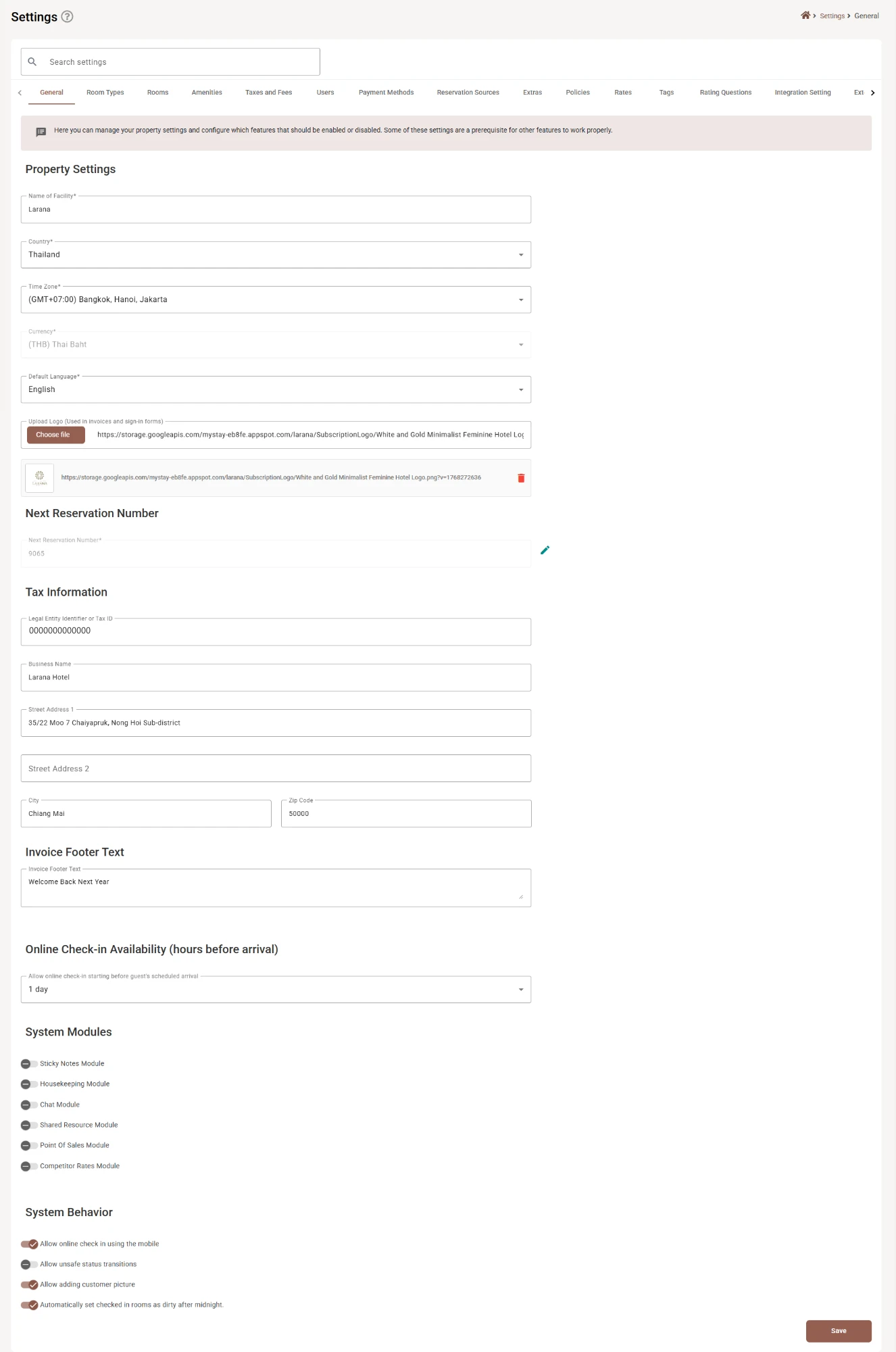
Property Settings
| Field | Required | What it does |
|---|---|---|
| Name of Facility | Yes | Your property’s name, up to 255 characters. It appears across the back office and on documents. |
| Country | Yes | Where the property is. Used for address formatting and regional behaviour. |
| Time Zone | Yes | The clock everything runs on — arrival times, report periods, the no-show cutoff, timestamps in the activity log. Set it before you take a single booking. |
| Currency | Yes | The currency every price and report is expressed in. Often locked — see below. |
| Default Language | Yes | The language the back office opens in for users who have not chosen their own. |
| Upload Logo | — | Used on invoices and sign-in forms. Choose file uploads it; the bin below removes it. |
Next Reservation Number
The number the next booking will be given. It is read-only until you click the pencil, and it locks itself again after saving — deliberate friction, because this one is easy to break.
Set it once when you move over from another system, so your numbering carries on where it left off rather than restarting at 1. After that, leave it alone: moving it backwards points new bookings at numbers that already exist.
This field saves on its own when you confirm the pencil edit. It is not included in the page’s main Save.
Tax Information
What appears on invoices and receipts. None of it is required by the form, but an invoice missing them is not much use to a guest claiming expenses.
| Field | Limit | What it does |
|---|---|---|
| Legal Entity Identifier or Tax ID | — | Your registered tax number. |
| Business Name | 255 characters | The registered name, which is often not the trading name. Larana Hotel on the invoice, Larana on the door. |
| Street Address 1 | 255 characters | First address line. |
| Street Address 2 | 255 characters | Second address line, if you need it. |
| City | 100 characters | |
| Zip Code | 20 characters |
These feed Invoices and receipts. Tax rates are a separate matter — those live in Taxes and fees.
Invoice Footer Text
Up to 500 characters at the foot of every invoice. Plain text — the place for a thank-you, a bank detail, or a note about how to claim VAT back.
Online Check-in Availability
Allow online check-in starting before guest’s scheduled arrival decides how early a guest may complete pre check-in. Three choices: Not specified, 1 day or 3 days.
There is a trade-off. Opening it earlier gets more guests through it before they travel, which is the whole point. Opening it too early means the details you collect are stale by arrival, and a guest who checked in online a week ago has usually forgotten they did.
System Modules
A set of switches that turn whole parts of SupremeStay on and off: Sticky Notes, Housekeeping, Transport, Chat, Shared Resources, Point of Sales and Competitor Rates.
Turning a module off removes its menu item and its features. It does not delete anything, so switching it back on brings the data with it — but anything that depended on it in the meantime, such as a housekeeping cleaning status, simply stops being maintained while it is off.
Some settings elsewhere check these switches. The Set as Clean / Set as Dirty action in Housekeeping, for example, only exists while the Housekeeping module is on.
System Behavior
Four switches that change how the system behaves day to day. Like the modules, some are only shown if your subscription allows them.
| Switch | What it does |
|---|---|
| Allow online check in using the mobile | Lets guests complete pre check-in from their phone. |
| Allow unsafe status transitions | Permits reservation status changes the system would normally refuse — checking out a booking that was never checked in, for instance. It exists for fixing mistakes, and it is off by default for a reason. |
| Allow adding customer picture | Lets staff attach a photo to a customer record. Consider what your local data-protection rules say before turning it on. |
| Automatically set checked in rooms as dirty after midnight | Every occupied room flips to dirty overnight, so housekeeping starts each morning with a full list rather than yesterday’s ticked-off one. Turn it off only if you service rooms on a schedule rather than daily. |
Transport Settings
This section only appears when the Transport module is switched on. It holds Auto abort time for pending requests — how long an unconfirmed transport request waits before cancelling itself. Minimum 1.
Saving
Save at the bottom writes the whole page. The one exception is Next Reservation Number, which saves separately through its pencil.
If something does not work
| What you see | Why |
|---|---|
| Currency is greyed out | It is locked because the property already has trading data. Contact support if it genuinely needs changing. |
| I cannot type in Next Reservation Number | Click the pencil beside it first. It locks again after saving. |
| A module I expect has no switch | Your subscription does not include it. See Subscription. |
| Transport Settings is missing | The Transport module is off. Switch it on and the section appears. |
| Times and dates are wrong across the system | Check the Time Zone. It drives arrivals, reports and the no-show cutoff. |
| Invoices are missing the business details | They come from Tax Information here, not from the invoice itself. |
| A tax is not being applied | Tax rates are set in Taxes and fees; this page only holds your identifiers. |
| Rooms are not turning dirty each morning | Automatically set checked in rooms as dirty after midnight is off, or the Housekeeping module is. |