
Payment Policy
How much of an online booking is collected up front, and in what form.
A payment policy answers one question: when someone books online, how much do you take now?
Each policy is a named rule — 50%, First night, THB 1,000 deposit — and each master rate points at one of them. The rate decides the price; the policy decides how much of that price is collected at the moment of booking.
Policies are shared across the property, so one list serves every booking engine and every rate you have.
Opening the page
There are two ways in, and they are worth telling apart:
- Settings → Policies → Payment Policy — the fuller view, which adds a Rates column.
- Settings → your booking engine → Payment Policy — the same list without that column.
Both edit the same policies. Use the Settings route when you are about to delete or reorganise anything, because it is the one that shows you what is in use.
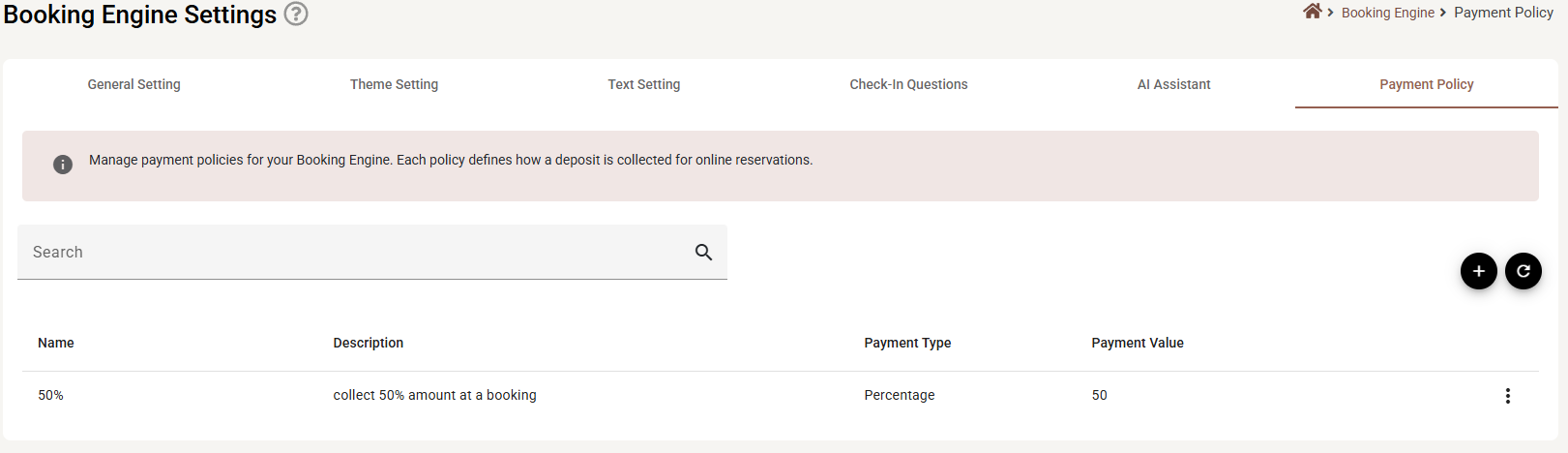
What is on the page

| Column | What it shows |
|---|---|
| Name | What the policy is called. This is what you will be picking from a list on a master rate, so it should read well out of context. |
| Description | Your own note about it, or a dash if you left it empty. |
| Payment Type | Percentage, First night or Fixed amount. |
| Payment Value | The number that goes with the type — or a dash for First night, which has no number. |
| Rates | How many master rates use this policy. Only in the Settings view. A zero here is what makes a policy safe to delete. |
The ⋮ at the end of a row offers Edit and Delete.
Adding or editing a policy
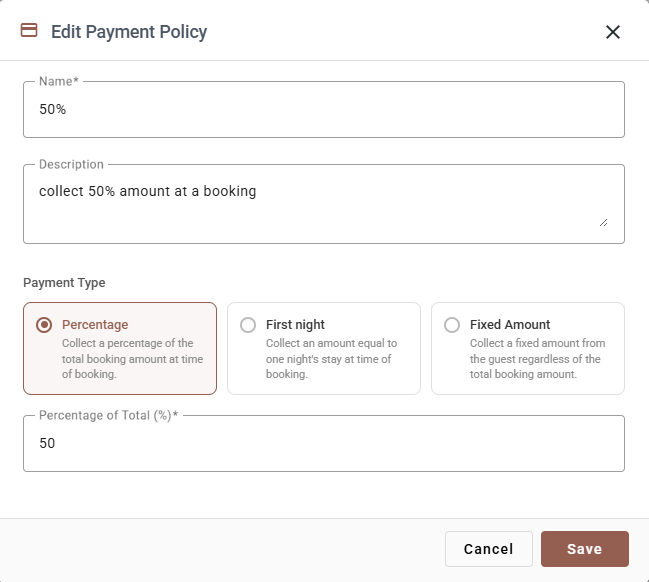
| Field | Required | What it does |
|---|---|---|
| Name | Yes | The label you will see on the master rate. Short and literal — 50% or First night — is better than Standard policy A. |
| Description | No | A sentence explaining the rule, for whoever reads the list next year. |
| Payment Type | Yes | One of the three cards below. |
| Percentage of Total / Fixed Amount | Depends on the type | The value. It must be greater than zero. |
The three types
| Type | What is collected | The value field |
|---|---|---|
| Percentage | A share of the whole booking total, at the time of booking. | Percentage of Total (%) — 50 means half. |
| First night | An amount equal to one night’s stay. | Greyed out, and cleared. There is nothing to enter — the amount comes from the booking. |
| Fixed Amount | The same amount from every guest, whatever the booking is worth. | Fixed Amount — in your property’s currency. |
Clicking a card selects it and the field underneath relabels itself. Switching to First night empties and disables the value field; switch back to Percentage or Fixed Amount and you must type the number again.
Save writes the policy immediately — this dialog is not affected by the Save button on the other Booking Engine tabs. Cancel and ✕ discard.
Deleting a policy
Delete on the ⋮ menu removes the policy — but only if nothing is using it. If any master rate points at it, the menu item is greyed out, and hovering it explains why. Point those rates at another policy first, then delete.
Deleting a policy does not touch deposits already collected on existing reservations.
How it reaches a guest
- You create the policy here.
- On a master rate, you pick it from the Payment policy list.
- A guest books that rate on the booking engine and is asked for the deposit the policy describes.
- The deposit arrives through whichever payment method the engine is set up to take, and shows against the reservation.
This is why one policy per rule is enough: the rule lives here, the choice of which rule applies lives on the rate.
If something does not work
| What you see | Why |
|---|---|
| Delete is greyed out | A master rate is using this policy. The tooltip says so, and the Rates column in the Settings view says how many. Change those rates first. |
| I cannot see the Rates column | You opened the list from a booking engine. Go to Settings → Policies → Payment Policy instead. |
| The value field is greyed out | First night is selected. That type takes no value. |
| Save does nothing and an error appears | The name is empty, or the value is zero or blank on a Percentage or Fixed Amount policy. |
| The list is empty | No policies exist yet. Press +. |
| Guests are not asked for a deposit | The master rate they booked has no payment policy on it — check the rate, not this page. |
| The wrong amount was taken | Check which policy the rate points at, and the number on it. A percentage is of the whole stay, not per night. |