
Navigating the workspace
The sidebar, the top bar icons, quick search, the help button and switching property.
Every screen in SupremeStay sits in the same frame: a sidebar down the left, a top bar across the right, and a title bar on the page itself. Learn the frame once and you can find anything.
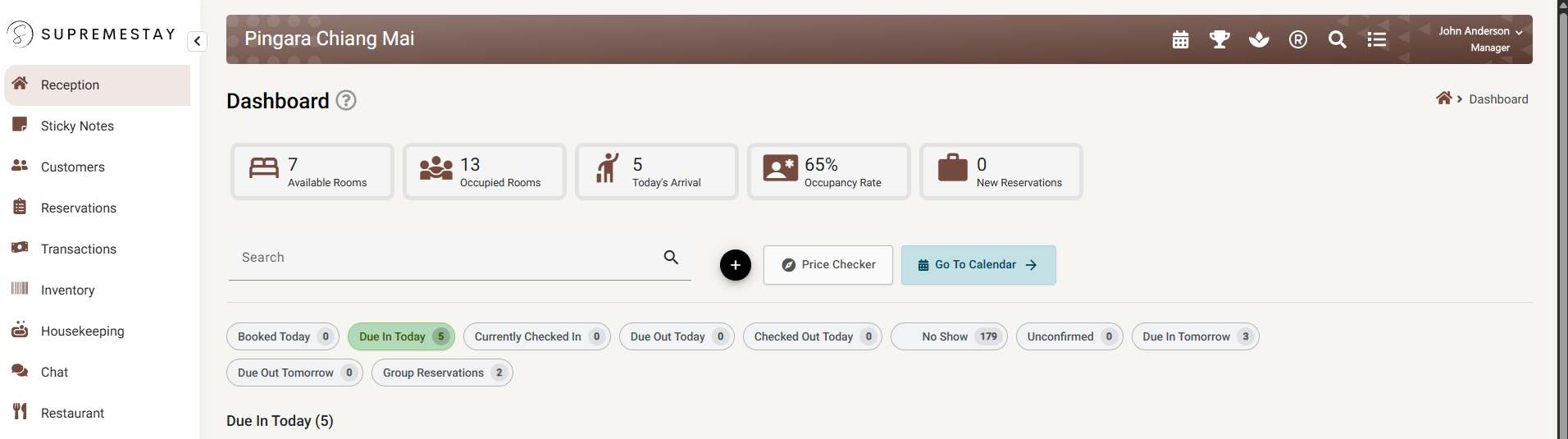
Four things are always in the same place:
| Where | What it is |
|---|---|
| Down the left | The sidebar — the areas you can open. |
| Across the top, in brown | The top bar — the property you are in on the left, shortcut icons and your name on the right. |
| Under it | The title bar — the page name, its ? help button, and a breadcrumb back to where you came from. |
| Everything below | The page itself. |
The sidebar
The left sidebar lists the areas you can open. Two things decide what appears:
- Your role. A housekeeper sees Housekeeping and nothing about money. See User roles and access levels.
- Your modules. A property with the restaurant module switched off has no Restaurant entry at all. Modules are switched on in General settings.
If a colleague has a menu item you do not, it is one of those two — not a fault.
Settings expands into sub-sections, and one of those — Theme Settings — expands again into the guest-facing modules (brand identity, housekeeping, breakfast, map, gallery, check-in, check-out). Your enabled booking engines also appear as rows under Settings, one per engine, labelled with the engine’s name and language.
The top bar
A row of icons at the top right, each a shortcut to something you would otherwise have to navigate to. Some appear only if you have access or the module is on.
| Icon | What it opens |
|---|---|
| Calendar | The availability calendar. |
| Trophy | Competitor rates, if that module is on. |
| Spa | Shared resources, if that module is on. |
| Money | Revenue planning. |
| Magnifier | Quick search — see below. |
| Bell | Your notifications inbox, with an unread count. |
| List | The activities log — what has been happening in the property. |
| Book | This help centre. |
On a narrow screen these collapse into a single ⋮ menu holding the same items.
Your name at the far right opens the profile menu: your Account, the property switcher, and sign out.
Banners
Two messages can appear across the top of every page, and both are asking for something:
- Missing general hotel settings, with a Set up hotel settings button. The property is not finished — see First-time property setup. It disappears on its own once the last setting is done.
- A subscription expiry warning. See Subscription.
Quick search
The magnifier opens quick search, which finds a customer by name or phone number. Each result shows their reservations with the status of each — booked, due in, checked in, due out, checked out, no-show — so you can go straight to the right stay.
This is the tool for the commonest situation at a desk: somebody is standing in front of you and all you have is a surname.
The title bar and the help button
Every page shows its title, a breadcrumb trail back to where you came from, and a ? button.
The ? is worth the habit: it opens the help article for that exact page. You never have to work out what a screen is called, or search for it — the button knows.
Switching property
If you work at more than one property, each is a separate subscription and you switch between them from the profile menu.
The property you are in is part of the page address, which has a useful consequence: a link you copy and send to a colleague opens the same record at the same property, not whichever one they happen to be in.
Language and theme
Your language and colour theme are set on your own Account page and follow you between devices. They change nothing for anyone else — two people at the same desk can run the same property in different languages.
If something does not work
| What you see | Why |
|---|---|
| A menu item a colleague has is missing for me | Either your role does not include it, or the module is off for the property. |
| A whole area disappeared after I switched property | Roles are per property. Check your access at the new one. |
| Quick search finds nothing for a booking number | It searches customers by name and phone. Use the Reservation list for booking numbers. |
| The ? opens the wrong article | Report it — the button maps each page to its article, and a mismatch is a bug worth fixing. |
| A banner will not go away | The missing settings banner clears only when all seven settings are done. See First-time property setup. |
| The interface is in the wrong language | Language is per person, on your own Account page. |