
Booking engine — Check-in questions
The questions bookers answer while booking, and the answers they may give.
Check-In Questions are the extra questions a guest answers while booking — smoking or non-smoking, parking, special requests. The answers arrive with the reservation, so the front desk knows about them before the guest does, and nobody has to ask at the counter.
The page is a stack of question cards. There is no list view and no search: what you see is the whole questionnaire, in the order guests will meet it.
Opening the page
- Open Settings in the left sidebar and click your booking engine’s name.
- Choose the Check-In Questions tab.
What is on the page
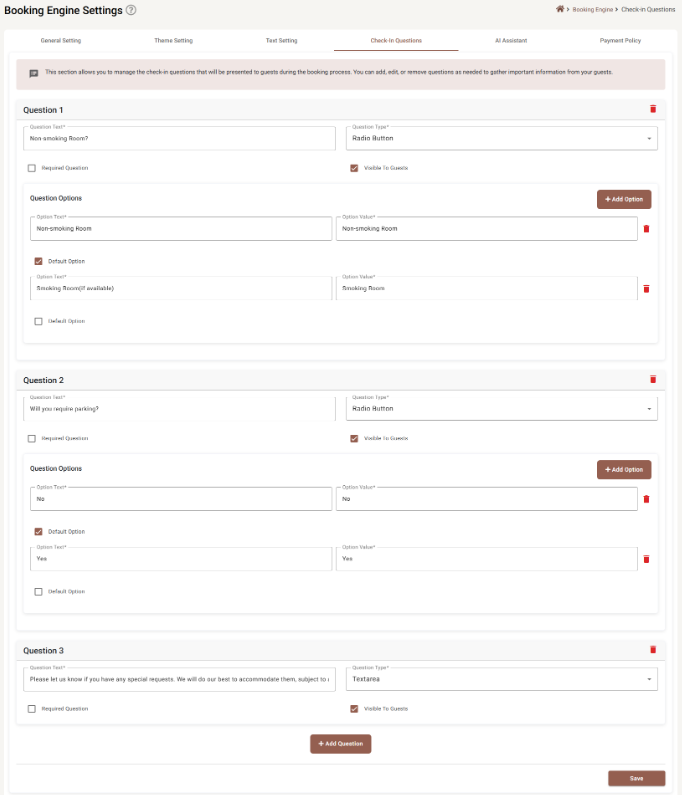
Each card is headed Question 1, Question 2 and so on. The number is just its position — it renumbers itself when you delete one. + Add Question at the bottom adds a card at the end, and Save writes the lot.
The fields on a question
| Field | Required | What it does |
|---|---|---|
| Question Text | Yes | What the guest reads. This is the question. |
| Question Type | Yes | How they answer — see the table below. |
| Required Question | No | When ticked, the guest cannot finish booking without answering. Use it sparingly. |
| Visible To Guests | No | Ticked by default. Untick to take a question out of the booking flow without deleting it — the wording and its options are kept for later. |
The five question types
| Type | The guest gets | Needs options |
|---|---|---|
| Text Input | A single line. | No |
| Textarea | A larger box for a paragraph — the right choice for special requests. | No |
| Checkbox | Tick boxes; more than one can be ticked. | Yes |
| Dropdown | A list to pick one from. Good when there are many choices. | Yes |
| Radio Button | Buttons side by side, one choice only. Good when there are two or three. | Yes |
A new question starts as Text Input.
Question Options
Dropdown, Checkbox and Radio Button questions grow an Question Options panel. Each option has two fields, both required and both capped at 100 characters:
| Field | What it is |
|---|---|
| Option Text | What the guest reads — Smoking Room (if available). |
| Option Value | What gets stored and shown to your staff — Smoking Room. Keep these short and consistent; they are what you will be reading on a busy morning. |
Default Option under each one preselects it. A default is a kindness on a question most people answer the same way — Non-smoking Room, No parking — because it turns a decision into a glance.
+ Add Option adds another. The red bin removes one, and greys out when only one option is left, so a choice question can never be left with nothing to choose.
Deleting a question
The red bin at the top right of a card removes it. There is no confirmation — it goes as soon as you click, and the change becomes permanent when you press Save. The bin greys out when only one question is left; to get rid of the last one, untick Visible To Guests instead.
Deleting a question does not delete answers already collected on existing reservations.
Saving
Save is greyed out while anything is incomplete — a question with no text, an option with no value. If it will not press, look for a red message inside one of the cards.
Saving here also saves unsaved work on the other tabs — see Booking Engine Settings.
How many to ask
Every question is another screen between a guest and a completed booking, and people abandon bookings. Two or three that change what you actually do — a room preference, parking, an arrival note — are worth having. A form that reads like a visa application is not.
Anything you can look up yourself does not need to be asked at all.
Where the answers go
They travel with the reservation and are visible in Reservation details, alongside anything the guest fills in through pre check-in.
If something does not work
| What you see | Why |
|---|---|
| Save is greyed out | A question has no text, or an option has no text or value. Every option field is required. |
| My options disappeared | The question type was changed. Changing it clears the options. |
| The bin icon is grey | You are on the last question, or the last option of a question. Neither can be removed. |
| Two options are both marked as default | Nothing prevents it. Untick one. |
| A question is not showing on the booking engine | Visible To Guests is unticked, or the change has not been saved yet. |
| Guests skip a question I need answered | Tick Required Question — but weigh that against the bookings you may lose. |