
Booking engine — General
The name, contact details, times, currency and booking window of the engine.
General Setting holds the facts about your property that the booking engine repeats back to guests, plus the two or three rules that decide how the booking flow behaves. It is the first tab, and the one to fill in before the others.
Opening the page
- Open Settings in the left sidebar and click your booking engine’s name.
- You land on General Setting — it is the tab the page opens on.
What is on the page
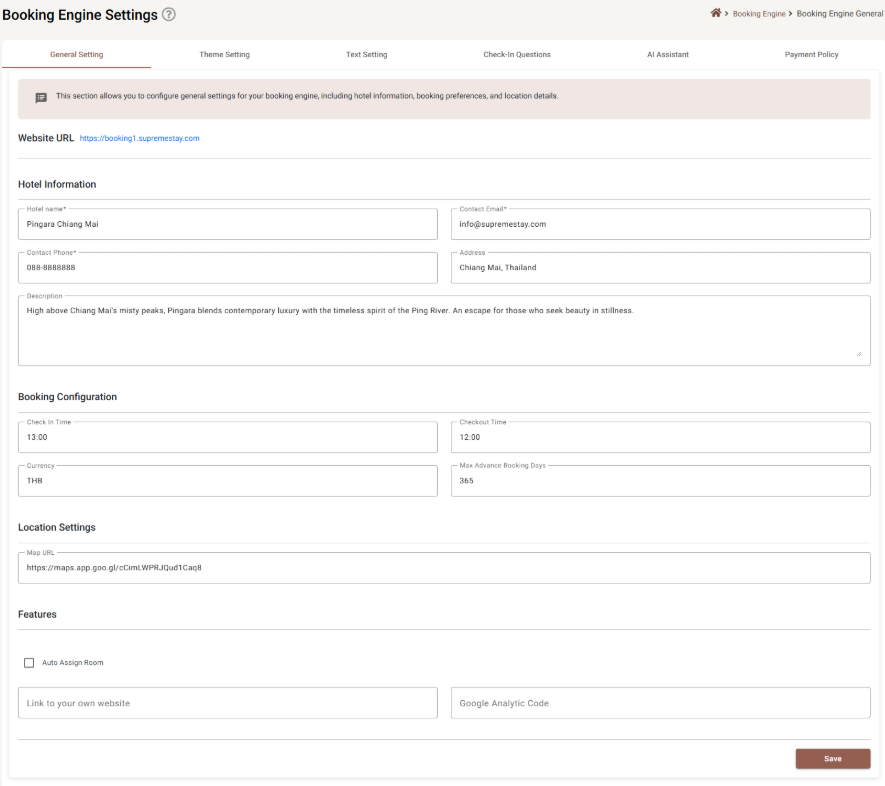
Website URL
The address your booking engine is published at, shown as a link. It is not editable here — it follows from the engine itself. Click it to open your live booking site in a new tab, which is the quickest way to check a change actually landed.
Hotel Information
| Field | Required | Limit | What it does |
|---|---|---|---|
| Hotel name | Yes | 255 characters | The name shown across the booking engine and in the confirmation the guest receives. |
| Contact Email | Yes | must be a valid address | Where guests are told to write. It is checked for shape (something@something), not for whether the mailbox exists. |
| Contact Phone | Yes | 20 characters | Free text — spaces, dashes and a country code all fit. |
| Address | No | 500 characters | The postal address, as one line. |
| Description | No | 1,000 characters | The paragraph that introduces the property. It is prose, not a list — one or two sentences do more work than ten. |
Booking Configuration
| Field | Required | What it does |
|---|---|---|
| Check In Time | No | The time from which arrivals are accepted, as HH:MM on the 24-hour clock — 13:00, not 1 PM. Anything else is refused. |
| Checkout Time | No | Same format. Shown to the guest and repeated in the confirmation. |
| Currency | No | The three-letter code the engine prices in — THB, USD, SEK. It is capped at three characters and typed in capitals. |
| Max Advance Booking Days | No | How far into the future the date picker will go. Between 1 and 999; the default is 365. Set it to 90 and nobody can book next year by accident. |
Location Settings
| Field | Required | Limit | What it does |
|---|---|---|---|
| Map URL | No | 500 characters | A link to your location on a map. It must be a real web address starting with http:// or https:// — a Google Maps share link pastes in as-is. Ordinary text such as behind the temple is refused. |
Features
| Field | What it does |
|---|---|
| Auto Assign Room | When ticked, an online booking is given an actual room number the moment it arrives, rather than waiting for someone to assign it. Which room it picks follows the auto-assign priority set on each room — see Rooms. |
| Link to your own website | Up to 500 characters. Your main hotel site, so guests can get back to it from the booking engine. |
| Google Analytic Code | Up to 100 characters. Your measurement ID, so bookings show up in your own analytics. Leave it empty if you do not use Analytics. |
Saving
Save sits at the bottom right and is greyed out while anything on the form is invalid — a missing hotel name, a malformed email, a check-in time that is not HH:MM. If it will not press, the reason is a red message somewhere above it; scroll up.
Saving here also saves your unsaved work on Theme, Text, Check-in questions and AI assistant, because all five tabs are one record. See Booking Engine Settings for what that means in practice.
If something does not work
| What you see | Why |
|---|---|
| Save is greyed out | Something on the form is invalid. Hotel name, contact email and contact phone are the three required fields. |
| The email is refused | It has no @, or nothing after the dot. |
| The check-in time is refused | It must be HH:MM on a 24-hour clock. 1 PM, 13.00 and 13:0 are all rejected. |
| The map link is refused | It must begin with http:// or https:// and contain a domain. |
| Max advance booking days will not accept my number | The range is 1 to 999. There is no way to allow more than roughly three years ahead. |
| The currency is cut to three letters | That is the limit. It is a code — THB — not a name. |
| The changes do not show on the live site | Press Save first, then open the Website URL link again. A browser sometimes holds the old page; reload it. |