
Booking engine — Text
Every word the booker reads, from button labels to the terms and conditions.
Text Setting is every piece of wording the booking engine shows a guest. Nothing here changes what the engine does — it changes what it says while doing it. The twelve fields are grouped into five sections that follow the order a booker meets them: the welcome, the buttons, the messages the system shows, the confirmation and policies, and the footer.
Opening the page
- Open Settings in the left sidebar and click your booking engine’s name.
- Choose the Text Setting tab.
What is on the page
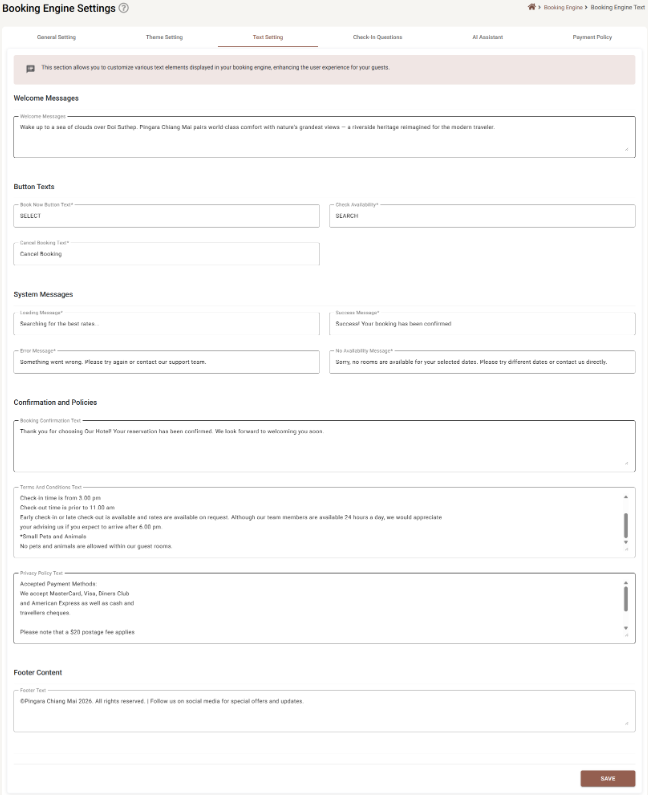
Welcome Messages
| Field | Required | Limit | What it does |
|---|---|---|---|
| Welcome Message | No | 1,000 characters | The line across the top of the booking engine. It is the first thing a booker reads, and the only field here that is trying to sell anything. |
Button Texts
These three replace the default labels. All are required and cannot be left empty.
| Field | Limit | Default |
|---|---|---|
| Book Now Button Text | 50 characters | Book Now |
| Check Availability | 50 characters | Check Availability |
| Cancel Booking Text | 100 characters | Cancel Booking |
Short wins. A button label that wraps onto two lines on a phone looks broken, and SELECT is understood everywhere that Reserve your escape is not.
System Messages
The four things the engine says while it is working. All four are required.
| Field | Limit | Default | When it shows |
|---|---|---|---|
| Loading Message | 100 characters | Loading... | While rates and availability are being fetched. |
| Success Message | 200 characters | Success! | When a booking goes through. |
| Error Message | 200 characters | An error occurred | When something breaks. Give people somewhere to go — a phone number is worth more than an apology. |
| No Availability Message | 200 characters | No rooms available for the selected dates | When the search finds nothing. This one earns its keep: it is read by people who still want to stay with you. Suggest trying other dates, or ask them to call. |
Confirmation and Policies
| Field | Required | Limit | What it does |
|---|---|---|---|
| Booking Confirmation Text | No | 2,000 characters | Shown once the booking is made, and repeated in the confirmation the guest keeps. |
| Terms and Conditions Text | No | 5,000 characters | Your booking terms. Plain text in a scrolling box — check-in and check-out times, the cancellation window, pets, extra beds. |
| Privacy Policy Text | No | 5,000 characters | How you handle guest data. Plain text as well. |
Neither policy field is required by SupremeStay, but your own obligations are a separate matter: a booking engine that takes payments and personal data usually needs both. Whether your terms are adequate is a question for whoever advises you, not for this page.
Footer Content
| Field | Required | Limit | What it does |
|---|---|---|---|
| Footer Text | No | 500 characters | The line at the foot of every page — copyright, a social-media mention, a registration number. |
Saving
Save is greyed out while anything is invalid, which here means one of the seven required fields is empty. Every field also trims itself when you click away, so trailing spaces will not sneak in.
Saving here also saves unsaved work on the other tabs — see Booking Engine Settings.
Writing for the booking engine
- Say what the button does. SEARCH and SELECT beat anything more inventive.
- Keep one voice. These twelve fields sit beside each other during one booking; if two of them sound like different hotels, the guest notices.
- Write for someone on a phone, in a hurry, possibly in their second language. Short sentences.
- Leave the defaults alone when they are already right. There is no prize for rewriting
Loading....
If something does not work
| What you see | Why |
|---|---|
| Save is greyed out | One of the required fields is empty — the three buttons and the four system messages. |
| My text is cut off | Each field has a hard character limit; the box stops accepting input at it. |
| The bold and bullets I typed came out as symbols | These are plain-text fields. Nothing is formatted. |
| The terms box only shows a few lines | It scrolls. The whole text is there and the guest sees all of it. |
| The new wording is not on the live site | Press Save, then reload the booking engine — the browser may be holding the previous page. |