
Booking engine — AI settings
The background facts the AI assistant answers guest questions from.
AI Assistant is where you tell the assistant on your booking engine what it is allowed to know about your property. Guests ask it questions while they are choosing dates — is breakfast included?, can I get there from the airport?, do you take pets? — and it answers from what is written here.
Nothing on this page is shown to guests as written. It is not a FAQ page. It is the assistant’s notes, and it is only as good as what you put in it.
Opening the page
- Open Settings in the left sidebar and click your booking engine’s name.
- Choose the AI Assistant tab.
What is on the page
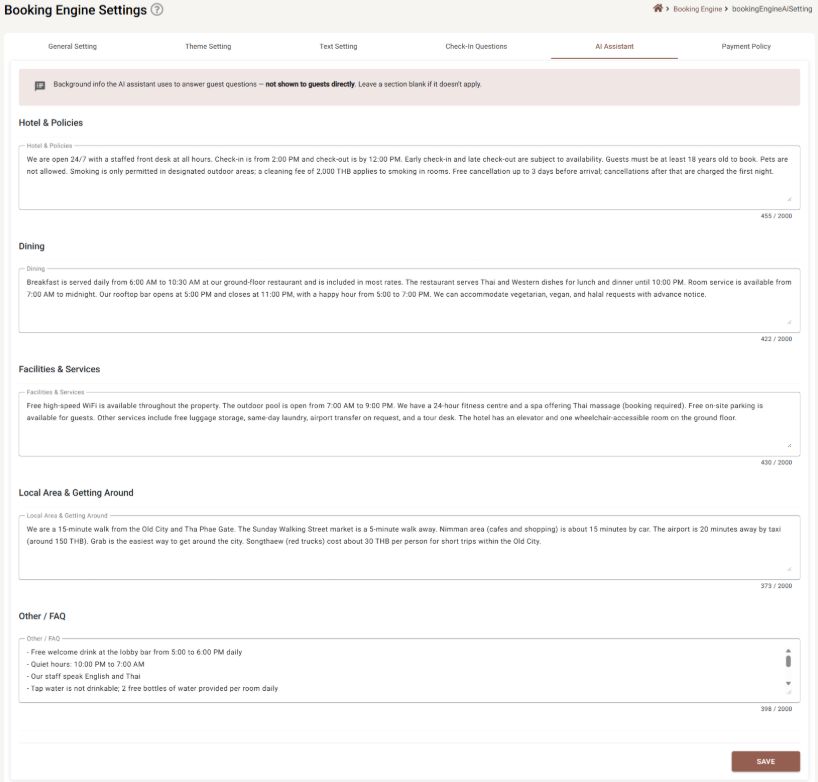
Five boxes, one per topic, each holding up to 2,000 characters — roughly 300 words. The counter under each box shows how much you have used. All five are optional; leave a section blank if it does not apply to you and the assistant simply will not claim anything about it.
| Section | What belongs in it |
|---|---|
| Hotel & Policies | Check-in and check-out times, cancellation window, minimum age, deposits, pets, smoking, children and extra beds, front-desk hours. |
| Dining | Breakfast — times, price, what is included in which rate. Restaurant and bar hours, room service, and what you can do about dietary needs. |
| Facilities & Services | WiFi, pool, gym, spa, parking, laundry, luggage storage, airport transfer, lift and step-free access. |
| Local Area & Getting Around | What is walking distance, what needs a taxi, how long the airport takes and roughly what it costs, the nearest station or market. |
| Other / FAQ | Everything that did not fit — quiet hours, which languages your staff speak, whether the tap water is drinkable, the welcome drink. |
Writing notes the assistant can use
The assistant answers from facts, so give it facts.
- Be specific and numeric. Breakfast is served 6:00 AM to 10:30 AM and is included in most rates can be answered with. We serve a lovely breakfast cannot.
- Write the exceptions, not just the rule. Pets are not allowed is more useful than silence, and free cancellation up to 3 days before arrival; cancellations after that are charged the first night is more useful than flexible cancellation.
- Full sentences. The assistant reads them better than fragments, and short bullet lines work fine for the Other / FAQ box.
- Put the thing in the right box. The assistant looks at all five, but a clean split keeps you from repeating yourself and contradicting yourself.
Keeping it current
Set a habit of rereading these five boxes whenever something about the property changes. The assistant has no other source: it does not read your website, your OTA listings or your rates, and it will keep repeating what is written here until someone updates it.
Saving
Save is at the bottom right, and is greyed out only if a box is over its 2,000 characters.
Saving here also saves unsaved work on the other tabs — see Booking Engine Settings.
If something does not work
| What you see | Why |
|---|---|
| The box stops accepting text | You have hit 2,000 characters for that section. The counter under the box shows it. Tighten the wording, or move something to another section. |
| The assistant gives an outdated answer | The text here has not been updated, or it was updated but not saved. |
| The assistant contradicts itself | The same fact is written two different ways in two sections. Keep each fact in one place. |
| The assistant says it does not know | That topic is not covered here. Add it, usually to Other / FAQ. |
| Guests can see this text on the booking engine | They cannot. It is background only; guests see the answers, not the notes. |