
Booking requests and unconfirmed bookings
Holding a room without committing it, and turning a request into a booking.
Not every enquiry is a booking. A room can be held for someone who has not yet committed — a corporate account waiting for approval, a tour operator holding space, a guest who will call back. SupremeStay calls that an unconfirmed reservation.
Creating one
On the reservation form, tick Set this reservation as unconfirmed and give a Hold until date and time.
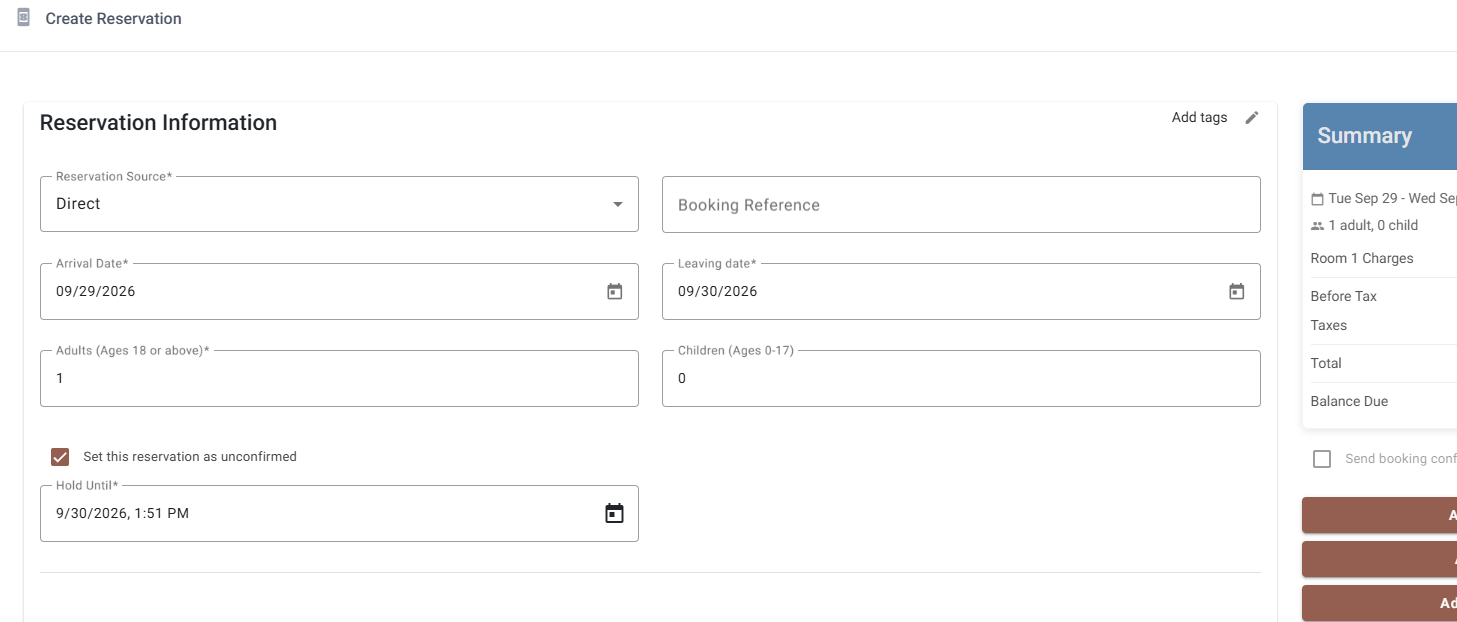
The reservation behaves like any other — it occupies the room on the calendar and blocks it from being sold twice — but it is clearly marked as not yet committed, and it carries a deadline.
Where they show up
- The Unconfirmed panel on the dashboard, with the message There are no unconfirmed reservations when there are none.
- The reservation list, where Status can be filtered to Unconfirmed.
Extending or changing the hold
Open the reservation and change the Hold until date. Use this when the guest asks for more time — moving the deadline is better than letting it lapse and rebuilding the reservation later.
Confirming a request
Clear the unconfirmed flag on the reservation. It becomes an ordinary booking straight away, keeps its reservation number, its rooms, its rates and anything already charged to it, and starts appearing in the normal arrival panels.
When nobody confirms
A hold that passes its date is yours to cancel. SupremeStay does not delete it silently — a held room that quietly disappeared would be worse than one that sat there — so review the unconfirmed panel as part of the daily routine and cancel what has gone cold.